
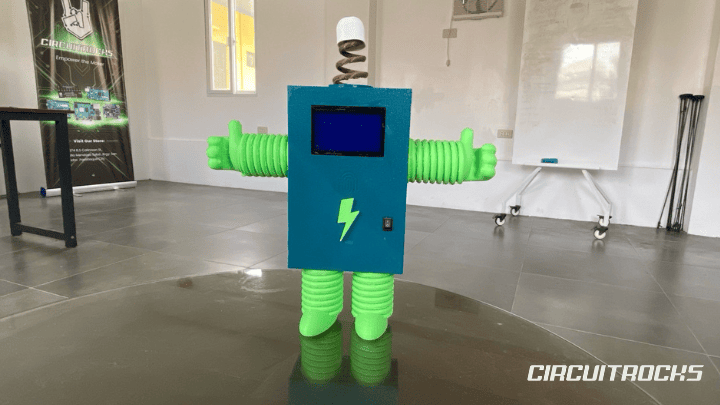
Meet Chip, a small robot character that smiles, blinks, talks, and reacts when someone interacts with it. 🤖🔉 This project idea shows how makers can turn simple electronic modules into a fun and expressive robot. Instead of only moving like a basic robot, Chip uses a screen for facial expressions and a speaker for sound reactions. This gives the project more personality and makes it more exciting to watch.
Chip can react in different ways. It can show a happy face when idle, blink to look more natural, laugh when touched, and play sounds when picked up or shaken. These simple reactions help the robot feel more alive. The project also gives readers an idea of how display animation, sound, touch, and motion sensing can work together.
This idea works well for students, hobbyists, and makers who want a creative ESP32 project. It does not need to be a complex walking robot to feel interactive. A clear face, a fun sound, and a simple reaction can already make people enjoy the build. Chip is a good example of how small parts can create a strong project concept.
Why Build Chip Robot?
A Robot With Personality
Chip is a great project idea because it focuses on personality, not just basic control. Many beginner projects only blink an LED, show sensor values, or move a motor. Chip gives the user a more playful experience because it reacts with both sound and facial expressions. This makes the project easier to understand and more fun to present.
The project also helps readers see robotics in a creative way. A robot does not always need wheels, arms, or complicated movement to feel interesting. It can also become engaging through emotion, timing, and response. Chip shows that a small robot character can feel alive when it reacts at the right moment.
A Good Multi-Module Project
Chip also shows how one ESP32 can manage different modules in one build. The ESP32 can control the display, sound module, touch input, and motion sensor. Each part has a separate job, but they work together to create one clear behavior. This helps readers understand how real interactive systems combine inputs and outputs.
This kind of project can prepare beginners for more advanced builds. Once they understand how Chip reacts, they can use the same idea for smart toys, talking displays, desk companions, and robotics mascots. The project gives a strong base for learning interaction design with electronics.
Easy to Present and Expand
Chip has strong demo value because people can interact with it directly. They can touch it, move it, or shake it, then watch the face change and hear a sound. The output is easy to see and hear, so viewers can understand the project quickly. This makes Chip useful for school projects, maker fairs, STEM demos, and store displays.
The project can also grow over time. A simple version can start with a happy face and sound reactions. A more polished version can include a 3D-printed body, more moods, LEDs, buttons, voice lines, or small movement. Each upgrade can make Chip feel more complete.
What You’ll Learn
- How to use an ESP32 as the main controller for an interactive robot character.
- How to draw simple facial expressions on an ST7920 128×64 graphic display.
- How to use the U8g2 library for drawing eyes, mouths, lines, circles, and pixels.
- How to connect and control a DFPlayer Mini for sound effects and voice clips.How to organize audio tracks into different reaction groups.
- How to read a touch input and trigger a reaction only once per touch.
- How to read an LSM303 accelerometer through I2C.How to detect simple movement events such as pickup and shake.
- How to use timers with
millis()for blinking and temporary expressions.How to combine display, sound, and sensors into one interactive behavior.
What You'll Need
How It Works
Chip works by using the ESP32 as the main controller for all reactions. The ESP32 checks the touch input, reads motion data, controls the display, and triggers sound effects. When nothing special is happening, Chip can stay in its normal happy state. It can blink from time to time, giving the impression that the robot is awake and active.
The display acts as Chip’s face. Instead of showing only text, it can draw eyes, a smile, closed eyes, or a laughing expression. This gives the robot visual personality without needing mechanical eyes or moving parts. A simple face on a screen can already make the robot feel more friendly, especially when the expression changes at the right moment.
The sound system gives Chip another layer of character. Different sound groups can be used for different events, such as startup, touch, pickup, and shake. This means Chip does not always need to play the same reaction every time. Random sound selection can make the experience feel more natural because the response is not too repetitive.
The touch input gives users a direct way to interact with Chip. When the robot detects a touch, it can switch to a playful expression and play a reaction sound. This makes the project feel interactive because the robot responds immediately to the user. It also shows how simple input sensors can create a more emotional or character-based response.
The motion sensor helps Chip react to movement. When the robot is picked up gently, it can play one type of sound. When it is shaken more strongly, it can respond with another reaction. This gives the robot a sense of awareness because it can tell the difference between normal idle time and physical movement. By combining motion detection with sound, Chip becomes more engaging to handle and test.
The overall behavior depends on different states. Chip can be happy, blinking, tickled, picked up, or shaken depending on the event detected. Each state changes what the user sees and hears. This is important because interactive robots need clear behavior, not just random outputs. A well-planned state system makes Chip easier to understand and more enjoyable to use.
Applications and Extensions
Chip can be used as a creative interactive robot companion for beginners who want something more expressive than a normal sensor project. It can sit on a desk, shelf, or display area and react when someone interacts with it. The project can be used to show how electronics can create personality through sound and visuals. This makes it a good build for students, hobbyists, and makers who want a fun project with a clear output.
It can also work well as a STEM or classroom demonstration. Teachers or presenters can use Chip to explain how sensors, displays, and sound modules work together. Instead of showing each module separately, Chip combines them into one character. This helps learners understand how separate electronic parts can become one complete system.
Chip can also be developed into a store demo or product showcase mascot. A small robot that talks and reacts can attract attention because people can interact with it directly. It can be used to demonstrate ESP32 projects, DFPlayer sound playback, display animation, and motion sensing. This makes it useful for showing customers what they can create with common maker components.
For extensions, Chip can be upgraded with more facial expressions. It can have a sleepy face, surprised face, sad face, excited face, or confused face. Each expression can match a sound effect or user action. This would make the robot feel more expressive and less predictable.
Another upgrade is to add more voice lines or sound categories. Chip can greet users when powered on, laugh when touched, complain when shaken, or say a short phrase when picked up. Adding more audio variety can make the robot feel more like a character instead of a simple sound player. It also gives builders room to customize Chip’s personality.
A 3D-printed enclosure can turn Chip into a more complete robot figure. The display can become the face, the speaker can be hidden inside the body, and the touch area can be placed where users naturally interact with it. A clean body makes the project easier to present and protects the electronics inside. With a good enclosure, Chip can look like a finished interactive mascot.
More advanced versions can include LEDs, buttons, Wi-Fi, Bluetooth, or small motors. LEDs can show mood colors, buttons can trigger special actions, and wireless features can allow phone control or remote commands. Small motors can make Chip move slightly when reacting, such as shaking, nodding, or turning. These upgrades can transform Chip from a reactive display project into a more complete interactive robot.
Watch the Full Demo Video
Here’s the Robot That Talks and Reacts
