
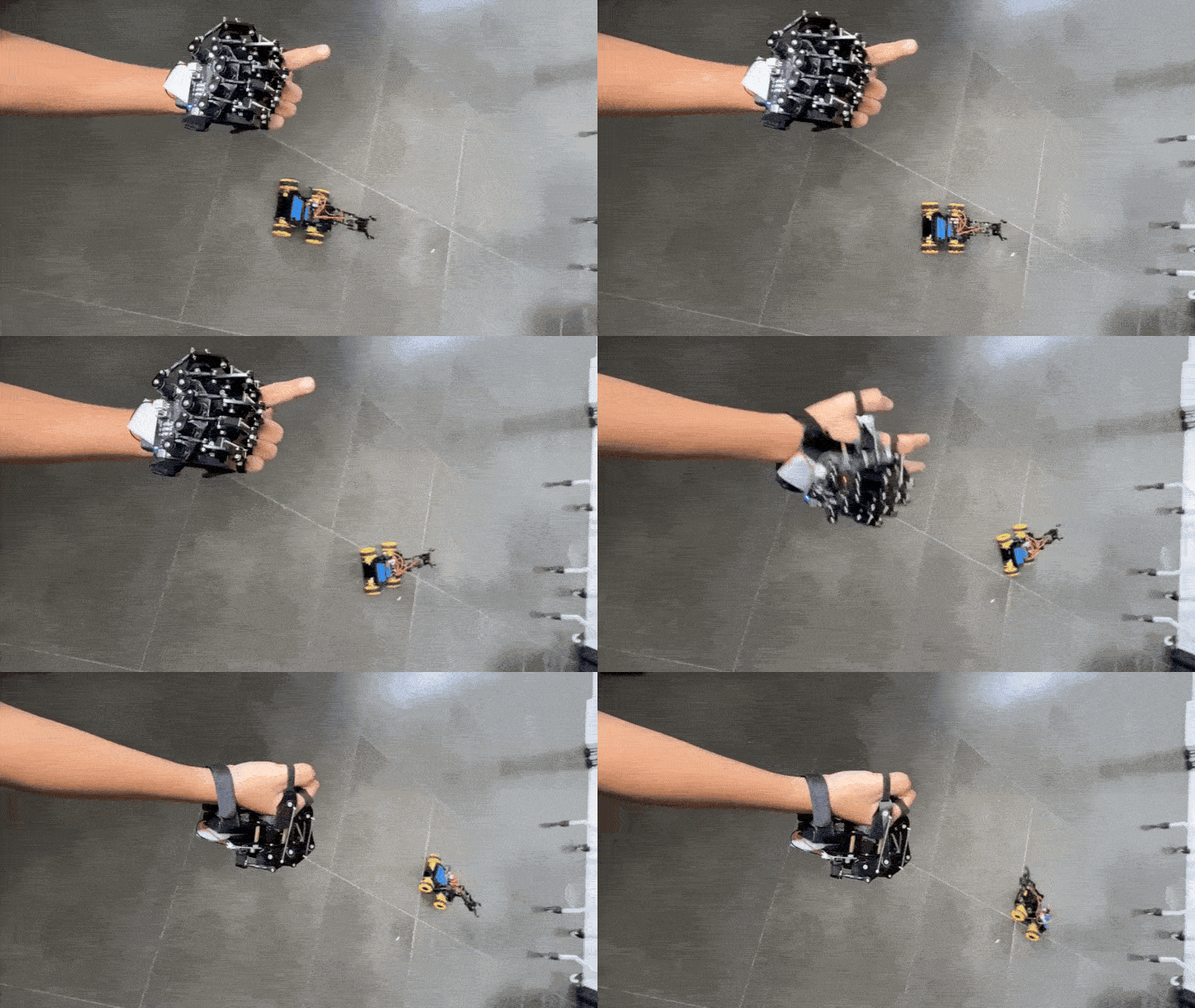
What if your robot car could respond to your hand gestures instead of using a normal remote controller? ☝️🤖 The ACEBOTT 4WD + Gloves ESP32 Project Idea explores that concept by combining a smart 4WD robot car with a wearable motion-sensing glove. The glove becomes the controller, while the car becomes the moving robot that follows the user’s command. This makes the project more interactive, more futuristic, and more exciting to demonstrate than a regular button-controlled robot car.
This idea is perfect for makers, students, and robotics learners who want a project that feels different from a standard smart car build. A 4WD car platform already gives you movement, direction control, and a strong base for robotics learning. When paired with a glove controller, the project becomes more engaging because the user controls the robot through hand motion. It turns a simple car project into a hands-on human-to-robot interaction experience.
This article is not a full assembly tutorial, since the kit may already include its own manual or setup guide. Instead, this is a project inspiration article that shows what users can possibly build using ACEBOTT ESP32-based kits. The goal is to help readers imagine what they can create before starting the actual build. If they are looking for a project that combines robotics, wireless control, and wearable input, this is a strong idea to explore.
Why Build?
The main reason to build this project is the unique control experience. Many robot cars use a phone app, joystick, or remote controller, and those are useful for basic operation. A glove controller feels different because the user becomes part of the control system. When the hand moves, the robot responds, which makes the project feel more natural and interactive.
It is also a good learning project because it combines several important robotics concepts in one build. Users can explore how a smart car moves, how wireless control works, and how input from a wearable device can become robot action. They can also understand the difference between motor control and servo control if they choose to add an arm or gripper. These lessons are useful for anyone who wants to continue learning robotics, automation, or embedded systems.
Another good reason to try this idea is that it can grow with the builder’s skill level. Beginners can start with basic gesture-controlled driving. Intermediate users can add mode switching, servo movement, or LED indicators. Advanced users can add sensors, obstacle detection, displays, sound feedback, or a robotic arm. The same base concept can become simple or advanced depending on the project goal.
What You’ll Learn
- How gesture control can be used as a robot input method.
- How two ESP32-based devices can communicate wirelessly.
- How a 4WD robot car can move in different directions.
- How Bluetooth Low Energy can connect a wearable controller to a robot.
- How one controller can manage more than one robot function.
- How servo motors can be added for a gripper or robotic arm.
- How LED indicators can show connection or mode status.
- How wearable electronics can make robotics projects more interactive.
- How a beginner robot car can grow into a more advanced prototype.
What You’ll Need
How It Works
The project works with two ESP32-based sides: the glove controller and the smart car receiver. The glove reads the user’s hand movement or selected input, then sends a wireless command through Bluetooth Low Energy. The ESP32 on the car receives that command and performs the matching action. This creates a simple flow: hand gesture, wireless command, robot response.
On the car side, the ESP32 can control the 4WD movement system. When the robot is in driving mode, glove commands can move the car forward, backward, rotate, or shift direction depending on the wheel setup. This is where the 4WD platform becomes useful because it already provides a strong base for movement experiments. The user can focus on the project idea instead of building everything from separate parts.
The same setup can also support an arm or gripper mode. In this mode, the glove no longer controls the wheels. Instead, the commands control servo motors attached to a gripper, base, or small robot arm. This gives the project two different functions in one robot: drive mode for movement and arm mode for object interaction.
A mode-switch button can make the project easier to use. For example, the user can drive the robot first, press a button to change mode, then use the glove to control the arm. An LED indicator can also show whether the robot is in driving mode or arm mode. These small details make the project feel more complete and easier to demonstrate.
Applications & Extensions
his project can be used as a robotics learning activity for students. It helps them see that robots do not always need normal remote controllers or phone apps. They can also be controlled through gestures, sensors, and wearable devices. That idea can inspire more creative robotics projects after the first build.
It is also a good project for STEM demonstrations and school exhibits. The user wears the glove, performs a gesture, and the robot responds. This type of interaction is easy to understand even for viewers who are not familiar with coding. Because the project has visible movement, it can quickly catch attention during presentations.
The idea can also be developed into a simple assistive robotics concept. A glove-controlled mobile platform can show how hand movement might control machines from a distance. It is not yet an industrial robot, but it introduces the same basic concept of remote manipulation. This makes it a good starting point for research, prototypes, and advanced student projects.
The ACEBOTT 4WD + Gloves ESP32 Project Idea is a creative way to show what is possible with robotics kits and wearable control. It goes beyond a normal robot car by adding gesture-based interaction. The user does not just press buttons; they control the robot through hand movement. That makes the project more engaging for both the builder and the audience.
This idea is especially good for students and makers who want a robotics project that stands out. It can start as a simple gesture-controlled car, then grow into a mobile robot with a gripper, sensors, lights, and feedback features. The ACEBOTT 4WD platform gives the robot its body, the ESP32 gives it wireless control, and the glove gives it a unique way to respond. Together, they create a project that is educational, interactive, and ready for creative upgrades.
