

About the Project
We all worry about our plants will be thirsty if we leave our home for a vacation or long trips so, We decided to design an automatic watering system to ensure that these plants are still alive when we come back here the next time, We do not need to worry about our bulbasaur everyday. Automatic Water Plant SprinklerParts Used
Parts used for ths project: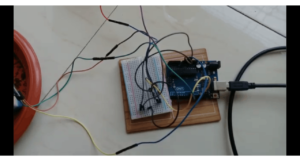
How It Works
I use DC motor to make water pump. DC motor has two leads one is positive and another one is negative. If we connect them directly to the Arduino board then it will damage the board. To overcome this problem, NPN transistor is used to control the switching activity of the motor according to the code. Arduino pin 13 (named as WATERPUMP in code) is used to turn on and off the transistor. According to the code to control the speed of the motor we need to enter a value between 0 and 255 in the Serial Monitor. I used 200 value for the speed of the motor. The soil moisture sensor consists of two leads that are used to measure volume of water content in soil. These leads allow the current to pass through the soil and in return calculates the resistance value to measure the moisture level. If there is more water in soil then soil will conduct more electricity, means less resistance value along with high level of moisture. In the same manner if there is less water in soil then soil will conduct less electricity, means high resistance value along with low level of moisture. https://www.youtube.com/watch?v=udW0bNttLB4Frequently Asked Questions
What does this Automatic Water Sprinkler tutorial cover?
We all worry about our plants will be thirsty if we leave our home for a vacation or long trips so, We decided to design an automatic watering system to ensure that these plants are still alive when we come back here the next time, We do not need to worry about our bulbasaur everyday.
What Arduino library does the Automatic Water Sprinkler tutorial use?
The sketch uses standard Wire.h (I2C) or SPI.h plus a part-specific library installable via Arduino IDE → Sketch → Include Library → Manage Libraries. See the Sample Code section.
Why does the Automatic Water Sprinkler act differently on USB power vs battery?
Battery voltage sags under load. Add a 100uF cap across the rails, use a 5V/2A regulator-backed pack, and never power motors from the Arduino's onboard regulator.
