Skip to content

Circuitrocks Learn | Arduino · ESP8266 · ESP32 Tutorials – Philippines

  • Shop
  • Home
  • Product Tutorials
    • Arduino
    • ESP8266
    • ESP32
    • ESP32 CAM
    • Raspberry Pi
    • Electronic Modules
  • Concept Tutorials
    • Electronics
    • Communication
    • Programming
  • Project Guides
  • PRIVACY POLICY

Home » Product Tutorials » Raspberry Pi » How to Control the Raspberry Pi GPIO using C » Pinout Command Line 1

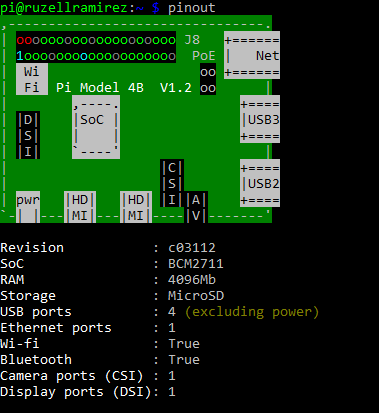
Pinout Command Line 1

Home » Product Tutorials » Raspberry Pi » How to Control the Raspberry Pi GPIO using C » Pinout Command Line 1

Pinout Command Line 1

Pinout Command Line 1

Share: TwitterFacebookReddit
Author: Ruzell Ramirez
Website

Related Articles

Dynamic OLED Animation Display with Arduino
Ultrasonic Obstacle-Avoiding Robot
Getting Started With ESP8266 - Featured
Getting Started with the ESP8266 chip
3D Mini Rain Car Wiper | Arduino Project Tutorial
Post navigation

How to Control the Raspberry Pi GPIO using C →
https://www.youtube.com/watch?v=GsT_gXIuwzs
https://www.youtube.com/watch?v=84fl3BLFKU8
  • Thumb Joystick | A Beginner’s Guide
  • Motor Drive (BTS7960 43A) | A Beginner’s Guide
  • Raspberry Pi Pico (RP2040) | A Beginner’s Guide
  • External LED via Wi-Fi | ESP32 Mini Guide
  • 3D Mini Water Dispenser | Circuit Easy Build

Categories

  • 3D Printers
  • Concept Tutorials
    • Communication
    • Electronics
    • Programming
  • Featured Software, Tools, and other Services
  • Product Tutorials
    • Arduino
    • Electronic Modules
    • ESP32
    • ESP32 CAM
    • ESP8266
    • Raspberry Pi
  • Project Guides
  • Uncategorized